

Visual StrongType
THE spreadsheet auditing tool
for Microsoft Excel©
You've never experienced confidence like this in your spreadsheets.
No matter how big, how old, how many authors, or how complicated, Visual StrongType will quickly give you a thorough understanding of a spreadsheet.
Visual StrongType is a stand-alone program that evaluates spreadsheets from within Excel.
When Visual StrongType evaluates a spreadsheet, formula cells are colour-coded right on the spreadsheet, using standard traffic light colours:
To see into a cell's formula, double click its coloured cell. A dialogue box will pop up showing the formula and its components:
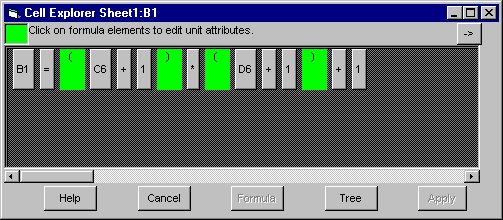
Formula dialogue box
From here, you can open a visual representation of the components displayed in a graphical tree. The tree diagram makes it easy to spot errors, even in intermediate calculations.
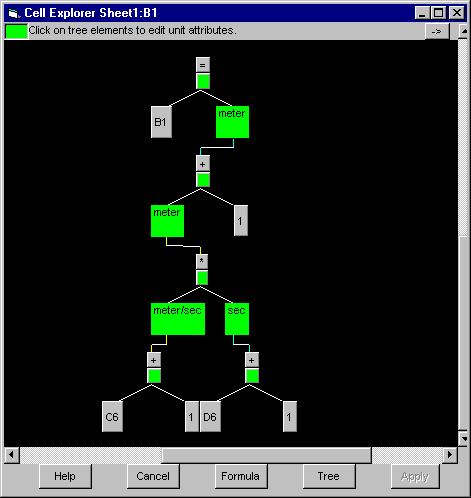
Formula tree diagram
If you need to correct a "unit" in a component of the formula, a wizard will walk you through the steps, then reapply the evaluation tool. A glance at the new tree diagram will tell you if you've fixed the problems. Other cells whose formulas depend on the changed cell's "units" are also re-evaluated.
Visual StrongType includes options to save your frequently used functions and units for reuse in the current spreadsheet or other workbooks. You will find this particularly handy for domain-specific functions and units, as you can pick them from a drop-down list box.
Email info@VisualStrongType.com for more information.
| June 16, 2020 © Copyright 1999-2020, StrongType Inc. |